Running as a Service
Description
The Classic Application Server can be run as a Windows Service. Previously, many developers used 3rd party products, such as AllwaysUp, to run the App Server as a service.
Alpha Software has now added this capability to the Classic Application Server. This means that you can run the Classic Application Server as a service without needing to install any 3rd party software.
Running the Classic Application Server as a service offers several advantages:
1. Automatic Startup: You can set the service to start automatically when the server is rebooted, eliminating the need to manually start the App Server after a restart.
2. Automatic Restart: If the App Server crashes, the service can be configured to automatically restart, ensuring minimal downtime.
3. Background Operation: The App Server can run in the background without requiring a logged-in user, ensuring continuous operation.
4. User Context Flexibility: The App Server can be configured to run in a different user context than the one currently logged in. This allows the server to operate with different permissions than those of the active user.
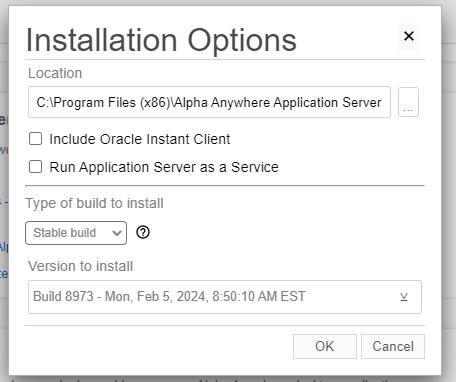
Now, when you install the Classic Application Server there is a new prompt on the Universal Installer dialog.
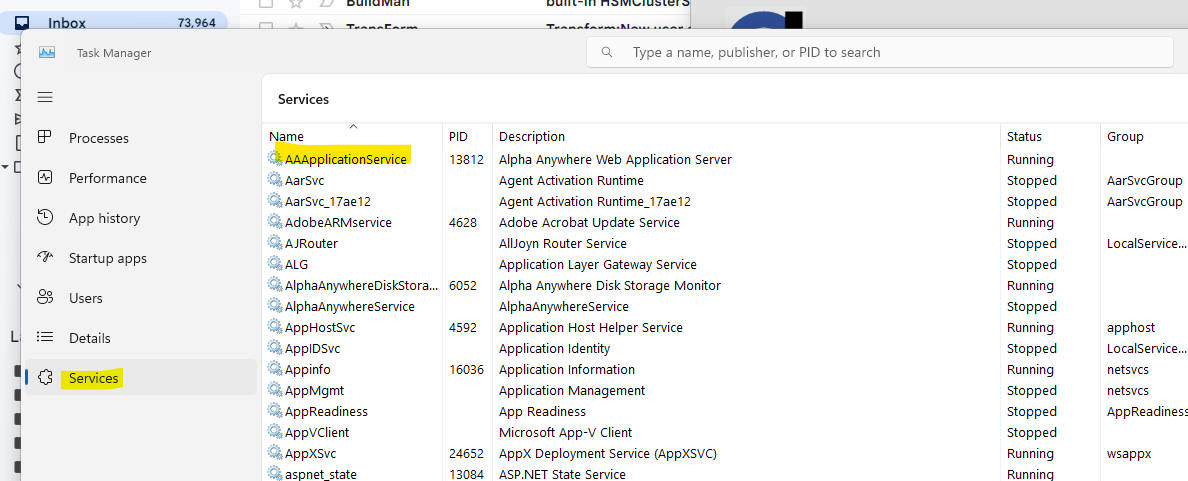
After the Application Server is installed, if you open the Windows Task Manager and you go to the Services pane, you will see the AAApplicationService listed.
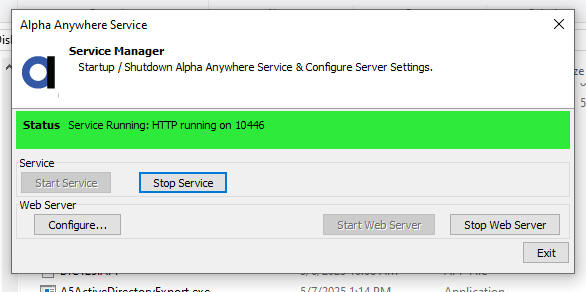
To configure the Server, navigate to the folder where the server is installed and launch AAApplicationServiceAgent.exe.

This will display the Alpha Anywhere Service dialog window. Text reads: "Service Manager: Startup / Shutdown Alpha Anywhere Service and Configure Server Settings".
See Also